Showing posts with label Bob's Work. Show all posts
In Game
The Monkey Hero
Category:
Bob's Work
,
Character
,
dsdn 232
,
Game Design
,
Games
,
Victoria University
By Robert McLeod 112
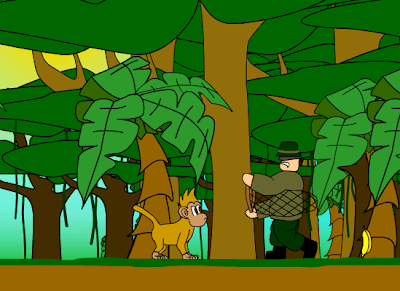
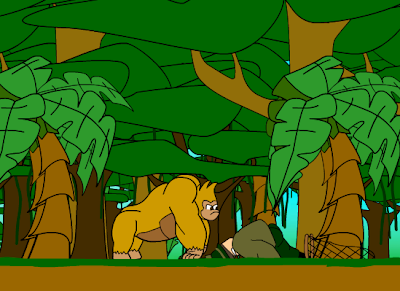
Here is the "hero shot" of my gorilla character. In the game if the monkey collects enough bananas he will have enough energy to take up his gorilla form and put the hurt back on the poachers.
Mini Monkeys
Category:
Bob's Work
,
Victoria University
By Robert McLeod 112
Making a Scene
Category:
Bob's Work
,
dsdn 231
By Robert McLeod 112
After buiding my characters, fully rigging them, it was time to develop my scene.
A couple friends and I came up with a story line for me to work with in my animation. The ideas had to work with the two characters I had created, a fearless/realively mindless skeleton warrior (which I named Bones) and a rock monster with anger management issues (which I named Rocky).
Storyline:
A couple friends and I came up with a story line for me to work with in my animation. The ideas had to work with the two characters I had created, a fearless/realively mindless skeleton warrior (which I named Bones) and a rock monster with anger management issues (which I named Rocky).
Storyline:
- Introduce Bones - running through a canyon
- Start an earthquake in the canyon while Bones is running
- Bones almost reaches the exit of the canyon but the earthquake causes a landslide which blocks Bones' exit.
- Rocky emerges from the ground behind Bones who now cannot run (not that he would, he is mindless)
- Rocky roars at Bones (just to make it obvious that he's not a particularly happy rock)
- Bones charges at Rocky
- Rocky owns Bones
- The end
This required for me to learn more about a few key tools in 3ds max for this animation, among other things:
- Reactor physics engine
- Biped animation
- Morpher modifier - for facial expressions
- Mental Ray sunlight
- Procutter (I didn't have time to learn enough maxScript to create better fractures)
Making a New Enemy
Category:
Bob's Work
,
dsdn 231
By Robert McLeod 112
Now that I had made my monster. I needed a to get him to sculpt a story. I knew he would be inherently angry and that I would have him destorying something but I needed to get it a motive, or something to be really angry at. This was a problem, because every idea that came to me resulted in me having to create another character.
I eventually gave in and forced myself to come up with a new character. I needed something to be stupid enough to run at this massive monster i created. I decided on a skeleton worrior, a character thats basically fearless, but also mindless, and something that I really enjoy to watch getting its ass get kicked.
I worked with a similar technique as my first character and attached my imported skeleton structure (from poser 7) to a biped, only this time all the skeletal bones were attached to their coresponding biped bones as rigid bodies, with the exception of the spine and ribs, which I would allow to deform.
I origionally wanted to have a massive battle scene which involved an epic fight scene between the two, a really slow moving but strong rock monster vs a really agile and fearless skelton. However, I only had 5 weeks, not nearly enough time to construct two characters, a dynamic environment, give it all material then animate the introduction of those two characters, apply physics to the environment and after all that, choreograph an epic fight scene... But that would have been awesome!
I eventually gave in and forced myself to come up with a new character. I needed something to be stupid enough to run at this massive monster i created. I decided on a skeleton worrior, a character thats basically fearless, but also mindless, and something that I really enjoy to watch getting its ass get kicked.
I worked with a similar technique as my first character and attached my imported skeleton structure (from poser 7) to a biped, only this time all the skeletal bones were attached to their coresponding biped bones as rigid bodies, with the exception of the spine and ribs, which I would allow to deform.I origionally wanted to have a massive battle scene which involved an epic fight scene between the two, a really slow moving but strong rock monster vs a really agile and fearless skelton. However, I only had 5 weeks, not nearly enough time to construct two characters, a dynamic environment, give it all material then animate the introduction of those two characters, apply physics to the environment and after all that, choreograph an epic fight scene... But that would have been awesome!
Building my Monster
Category:
Bob's Work
,
dsdn 231
By Robert McLeod 112
I wanted my character to be as close to the opposite of the fairy that I made in the first project. Which is how I knew I was going to make a monster. It was going to have to have a solid texture, very unlike the translucent material I used for my fairy's skin. To do this I was going to make rock. Put both these together you get a rock monster.
Building this beast was going to take a lot of time. Lucky I had learnt how to make a basic mesh and bone structure (using a biped) in my first project. This time I was going to use a technique called box modelling more closely. This pretty much meant I was going to start with a box, and my monster would evolve from there. However I was going to work a little backwards and make the biped first, just so I had a shape that I could work towards (it also meant that I didn't have to spend hours perfectly repositioning the bones later).

My main difficulty with my biped last time was that my mesh became overly deformable, which meant when I moved some parts of the character other parts would be deformed, mostly in ways I didn't want. To make this more challenging, my new character was going to be made of rock, a mostly undeformable and rigid material. To combat this I made a base mesh which I would allow to deform and attach it to the biped, then added parts which I would force to remain rigid by attaching it to an individual bone rather than the whole biped, for example the left upper arm rock I attached to the left shoulder bone of the biped (thats the difference between 5 and 6 in the image above).
The Making of Rockin Bones
Category:
Bob's Work
,
dsdn 231
By Robert McLeod 112
This was a response to my Design 231 (VUW) project 02 brief. The project asked us to develop a profile of a character, a character which be the tool used to sculpt a story.
My last project (The Fary Beginning), was a really nice, slow, pretty subtle animation. This time I wanted to make something bad ass, fast and epic, just to try and show I can achieve both extremes and give my work some variety. There would be no pretty characters or subtle movements.
I also wanted to challenge myself to learn more about the tools that I used in my first project and build on areas what I needed improve on from my last project, like the lack of variety and quality of materiality. I also wanted to make things more interesting by adding facial features and expressions and generally add the little details which give a character more life.
These were things that I knew I wanted to achieve from day one. But also something I knew would require a stupid amount of commitment to achieve in 5 weeks.
My last project (The Fary Beginning), was a really nice, slow, pretty subtle animation. This time I wanted to make something bad ass, fast and epic, just to try and show I can achieve both extremes and give my work some variety. There would be no pretty characters or subtle movements.
I also wanted to challenge myself to learn more about the tools that I used in my first project and build on areas what I needed improve on from my last project, like the lack of variety and quality of materiality. I also wanted to make things more interesting by adding facial features and expressions and generally add the little details which give a character more life.
These were things that I knew I wanted to achieve from day one. But also something I knew would require a stupid amount of commitment to achieve in 5 weeks.
Post-Production Production
The concept that got me started on my Quartz Composer path was based on dancing. What I was hoping to do was create an audio visual patch which would allow the user to manipulate a character's movements. The individual movement would be plain and simple on its own, but, a lot like dancing, a combination of these simple movements create a complex and visually appealing new flow of motion.
Thinking about this further, I would like to offer a different view on how to think of dance. Dance is usually performed in response to music, particularly to a beat. In this project I wanted this trend to be reversed, and instead have the music play in response to movement. This way, only when the correct combination of movements are made will the beat create fluency and rhythm.
The process involved in the creation of this patch started with the recording of a friend in a plain space. The recording involved him making preforming simple single movements. This recording was imported into After Effects where he was removed from the background and the individual movements were rendered in single video files. In Quartz Composer these files were linked to buttons on the keyboard; one button for each movement. Linked to the same buttons were simple sounds. I was able to highlight my friend through a motion tracker, which was given color through a color generator. Videos were imported from Video Pong to be linked to the melody and bass sounds which were given the same motion and color treatment. The result was a colorful environment capable of visual and audible change.
Thinking about this further, I would like to offer a different view on how to think of dance. Dance is usually performed in response to music, particularly to a beat. In this project I wanted this trend to be reversed, and instead have the music play in response to movement. This way, only when the correct combination of movements are made will the beat create fluency and rhythm.
The process involved in the creation of this patch started with the recording of a friend in a plain space. The recording involved him making preforming simple single movements. This recording was imported into After Effects where he was removed from the background and the individual movements were rendered in single video files. In Quartz Composer these files were linked to buttons on the keyboard; one button for each movement. Linked to the same buttons were simple sounds. I was able to highlight my friend through a motion tracker, which was given color through a color generator. Videos were imported from Video Pong to be linked to the melody and bass sounds which were given the same motion and color treatment. The result was a colorful environment capable of visual and audible change.
Project 1 explained...
OK, considering the ridiculously poor attempt at a presentation, I feel its important for me to explain my assignment hand in. Seeing as this is my first (and probably the only) post about my project it's best if I start at the beginning. Origionally it was my aim to come up with a 30 sec clip which was more, in a sense happy. The reason behind this was other, having seen some of the previous students work, I felt there was a general unhappy and negative theme in most of them. So I made it my aim to search and download open source media which I felt sent across positive images.
From there my ideas developed, and changed. I wanted to make a short story about someone's life, and showing only memories that were, in my opinion, beautiful. From there the idea of someone's life flashing before their eyes came into mind. I decided to go with it even though it started to drift away from being happy, seeing as the whole idea behind your life flashing before your eye is something thats supposed to occur when you die. As a result: life remixed.
This is where I, pretty much, completely abandoned happiness and said, 'what the hell, lets blow something up'. In searching for materials for my first video I came across a clip of a mother talking to her child, just after giving birth. To avoid ruining my video for you I wont tell you what she said, but I wanted her loving words to be contrasted completely by the content in the remainder of the clip, which would involve mankind at its worst, most significantly the atom bomb.
My final clip I decided not to include in my website, mostly because the theme seemed rather distant from the other two. In the first two videos we see the life of a character, be it flashing before a dying mans eyes or an exaggerated destructive nature of man. This this clip's theme was more focused on sexual desire, and taken from only one origional source, where as the other two were a mixture of many. I wanted the most important point in this video to be the kiss, to moment where his dreams meet reality. I decided that this would be best placed at the end, where he finally gets what he's been longing for, which was shown in the first parts of the video.
Well, hopefully that explanation didn't read too much like and essay, especially since it was so long, but I'm sure it helped you to understand where my work was coming from.
Music Network
Network Analysis
Having looked at many blogs in the Design 112 network this week, i can confidently say that the sites I found most appealing had simple templates where the layouts made the content easy to read through. There are many blogs on the web that fill up their page with images an videos in seemingly random and disorganised sizes and positions, which makes the world wide web a world wide mess, so it is relieving to see some tidy sites in this network! In particular look at Matt Eales, James Russell, Nathan Berrett. To view my comments click on my Archive.
The Sexy Project
Category:
Bob's Work
,
Victoria University
By Robert McLeod 112
The dictionary definition of the word ‘sexy’ is: Arousing or tending to arouse sexual desire or interest. I was working on demonstrating the meaning of the word 'sexy' in the video by making the letters of this word seem sexy. This was done by slowly following the curves of the letters 's' and 'e' and the straight features of the 'x' and the 'y' in a seductive manor. The slow smooth movement of the video is strongly complimented by the song "let's get it on" by Marvin Gaye in the background, in an attempt to further demonstrate the meaning of the word sexy.
New Comer
Category:
Bob's Work
,
Victoria University
By Robert McLeod 112
For this project we (the design101 students) had to choose a word or our choice, and describe the meaning of that word using only the letters that spell it. Our options were in no way limited, but I was looking for a word which I thought would be funny, as well something that I felt would be hugely different from what my other peers were doing. For this reason I decided to choose the word sexy. But as well as this I was exited by the challenge of trying to make letters seem sexy.
The dictionary definition of the word ‘sexy’ is: Arousing or tending to arouse sexual desire or interest. I was working on demonstrating the meaning of the word 'sexy' in the video by making the letters of this word seem sexy. This was done by slowly following the curves of the letters 's' and 'e' and the straight features of the 'x' and the 'y' in a seductive manor. The slow smooth movement of the video is strongly complimented by the song "let's get it on" by Marvin Gaye in the background, in an attempt to further demonstrate the meaning of the word sexy.